- TV, Video & Audio Parts Products
- sku: 1839210709877533
- INLINE 17111
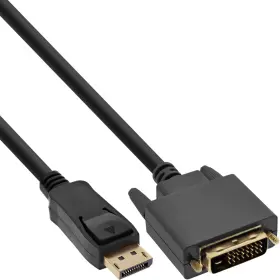
17111 INLINE Displayport Dvi Converter Cable
| Brand | INLINE |
|---|---|
| Manufacturer Part Number | 17111 |
| Part Type | CONVERTER CABLE |
| Unit Type | UNIT |
Review INLINE Displayport To Dvi Converter Cable Black 1m
Introducing the Inline 17111 DisplayPort to DVI Converter Cable, a versatile and high-performance solution for connecting devices with different video output interfaces. With a length of 1 meter (3.28 feet), this cable enables seamless connectivity between your DisplayPort-enabled computer and a DVI monitor or projector. It is an excellent choice for upgrading your setup or expanding your connectivity options.
The Inline DisplayPort to DVI Converter Cable supports full HD 1080p resolution at a maximum refresh rate of 60Hz. You can enjoy crisp and clear visuals, making this cable an ideal solution for gaming, video editing, or multimedia presentations. It is also backwards compatible with older DVI-only displays, ensuring compatibility with a wide range of devices.
Engage in a plug-and-play experience as this cable requires no external power source. It is designed with a space-saving inline design, minimizing the clutter and mess caused by extra power adapters or external converter boxes. Moreover, it comes with a high-quality aluminum casing that protects against electromagnetic interference (EMI) and radio frequency interference (RFI), safeguarding your investment.
This DisplayPort to DVI Converter Cable is tested for reliability and durability, and built with top-grade materials, including 24-karat gold-plated connectors, which resist corrosion and ensure optimal contact for stable and uninterrupted signal transmission. It is RoHS and WEEE compliant and comes with an industry-standard 1-year warranty, guaranteeing you a worry-free user experience.
Flexible and universally compatible, the Inline 17111 DisplayPort to DVI Converter Cable is the ideal choice for resolving your connectivity concerns and enhancing your multimedia experience.
Buying an Inline 1m DisplayPort to DVI Converter: Pros and Cons
An Inline 1m DisplayPort to DVI converter cable can be a useful solution if you need to connect a DisplayPort monitor or source to a DVI display while maintaining the original cable length or aesthetics. Here are some potential advantages and disadvantages:
Pros:1. Maintains Original Cable Length: Inline converters help in preserving the original cable length as they are added to an existing DisplayPort cable. This is useful for preventing potential issues that may arise when using an active adapter, such as signal loss.
2. Improved Signal Quality: Inline converters can enhance the signal quality by functioning as a passive repeater, which amplifies and regenerates the signal to maintain its strength throughout the entire length of the cable.
Pros continued:3. Visually Appealing: Inline converters can add an elegant and minimalist touch to your setup as they do not require additional external boxes or power sources.
4. Easy Installation: The plug-and-play nature of inline converters makes the installation process simple and quick, as there is no need for additional software or drivers.
Cons:1. Limited Compatibility: DisplayPort and DVI are two different connector types, and the compatibility of a converter largely depends on the DisplayPort source, the DVI monitor or display, and the quality of the conversion circuitry. Ensure that both your device and display support the required data rates and resolution to work with the converter.
Cons continued:2. Cost: Inline converters can cost more than traditional adapter solutions due to the added functionality and quality components required to maintain signal integrity.
3. Potential for Limited Support: Given the specific nature of inline converters, there is a lesser likelihood that vendor support will be available compared to more widely used adapter designs.
Conclusion:An Inline 1m DisplayPort to DVI converter is a worthwhile investment if you need a sleek, flexible solution for preserving cable length and potentially improving signal quality while connecting your DisplayPort source or monitor to a DVI display. However, it comes with a higher cost and has limited compatibility, requiring careful consideration to ensure that it will work effectively with your specific device and display combination.
Recommendation:If you are in need of a reliable and affordable alternative, consider looking into active DisplayPort to DVI adapters instead. These active devices offer broader compatibility, ensuring that you can connect a DisplayPort source or monitor to a DVI display without issues. However, keep in mind that active adapters may require external power, can be larger in size, and might be less aesthetically appealing due to the additional hardware.
While an inline converter offers advantages in maximizing cable length while maintaining visual appeal, it can be costlier and have more limited compatibility compared to an active adapter. Ultimately, your decision depends on your specific requirements and priorities for your setup.
Details:
Inline displayport to dvi converter cable, black, 1m.
specifications tvvideoaudio:
- brand: Inline
- mpn: 17111
- part type: Converter Cable
- unit type: Unit
returns tvvideoaudio:
- method: money back
- paid by: seller
- time: 30 days
- policy: returns accepted
general tvvideoaudio:
- category: Electronics > Home > Tv, Video Audio Parts
shipping tvvideoaudio:
- transit: 13-21 days
- class: standard, expedited
- type: fixed
- service: standard, expedited
payments tvvideoaudio:
- wallet: apple-pay
- credit card: discover
- other
seller tvvideoaudio:
- city: charlotte, north carolina
- # reviews: 25623
- rating: 98.3%
offer tvvideoaudio:
- availability: in stock
- prices: $29.34–$191.25
- item condition:
- Used
- Neu
- New
- Nuovo
- options: ship-to-home
- started: january 21, 2025
- in stock #: 5
- sold #: 20
Similar Items:
- Inline 17183i Displayport To Hdmi Converter Cable 4k 60hz Black 3m Inline displayport to HDMI converter cable, 4K/60HZ, black, 3M...(November 13th, 2024)
- Inline 17183 Displayport To Hdmi Converter Cable Black 3m Inline displayport to HDMI converter cable, black, 3M...(November 15th, 2024)
- Inline 17113 Displayport To Dvi Converter Cable Black 3m Inline displayport to dvi converter cable, black, 3M...(November 15th, 2024)
- Inline 17199k 4043718126262 Video Cable Adapter 0.15 M Displayport Dvi-d Black Displayport adapter cable male to dvi-d 24 1 female black 0.15M...(November 15th, 2024)
- Inline 17664p Hdmi To Dvi Cable Male 18 1 Gold Plated 1.5m Inline HDMI to dvi cable male / 18 1 gold plated 1.5M...(November 16th, 2024)
- Inline 17185i Displayport To Hdmi Converter Cable 4k 60hz Black 5m Inline displayport to HDMI converter cable, 4K/60HZ, black, 5M...(November 16th, 2024)
- Inline 17112 Displayport To Dvi Converter Cable Black 2m Inline displayport to dvi converter cable, black, 2M...(November 18th, 2024)
- Inline 17659p Hdmi To Dvi Cable Male 18 1 Gold Plated 0.5m Inline HDMI to dvi cable male / 18 1 gold plated 0.5M...(November 21st, 2024)
- Inline 17661p Hdmi To Dvi Cable Male 18 1 Gold Plated 1m Inline HDMI to dvi cable male / 18 1 gold plated 1M...(November 22nd, 2024)
- Inline 17670i Hdmi-dvi Adapter Hdmi A Male Dvi Female 0.2m Inline HDMI-dvi adapter HDMI a male / dvi female 0.2M...(December 27th, 2024)
- Inline 17663p Hdmi To Dvi Cable Male 18 1 Gold Plated 3m Inline HDMI to dvi cable male / 18 1 gold plated 3M...(January 14th, 2025)