- TV, Video & Audio Parts Products
- sku: 2099484563254563
- COMPUCABLE KVM-801PR-OSD
KVM-801PR-OSD COMPUCABLE Power Controller Ac Adapter
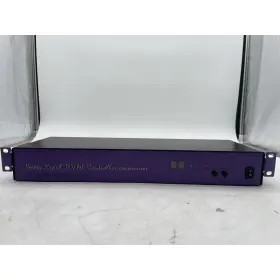
| Brand | COMPUCABLE |
|---|---|
| Manufacturer Part Number | KVM-801PR-OSD |
| Part Type | CONTROLLER ADAPTER |
| Color | PURPLE |
Review COMPUCABLE Power Reach Kvm Controller No Ac Adapter
The CompuLab KVM-801PR-OSD is a powerful KVM (Keyboard-Video-Mouse) controller designed for managing multiple computers from a single console. This particular model comes with an AC adapter, specifically the JEC1 type, making it a convenient and complete solution for users who need to switch between computers quickly and efficiently.
The KVM-801PR-OSD is a full-featured KVM switch that supports eight computers and offers an on-screen display (OSD) for easy configuration and setup. It provides a clear and intuitive interface that allows users to easily switch between connected computers, monitor their status, and manage their connected peripherals.
The KVM switch supports a wide range of video resolutions, including 1080p, making it suitable for use with modern high-definition displays. It also features a USB 2.0 hub with four ports, allowing users to connect additional peripherals such as printers, scanners, or external hard drives to any of the connected computers.
The KVM switch supports both PS/2 and USB keyboards and mice, ensuring compatibility with a wide range of input devices. It also includes audio support, allowing users to switch audio between connected computers and use the integrated speakers or headphones for audio output.
The AC adapter included with the KVM-801PR-OSD, specifically the JEC1 type, provides a reliable and stable power source for the KVM switch. It is designed to deliver the necessary power to the KVM switch while also complying with international safety standards, ensuring safe and efficient operation.
Overall, the CompuLab KVM-801PR-OSD with AC adapter JEC1 is a versatile and feature-rich KVM controller that offers users the ability to manage multiple computers from a single console with ease and convenience. Its wide range of video resolutions, USB hub, audio support, and compatibility with various input devices make it an excellent choice for users in a variety of industries, including IT, education, finance, and more.
Pros and Cons of buying a CompuLab KVM-801PR-OSD Power KVM Controller with AC Adapter JEC1
The CompuLab KVM-801PR-OSD Power KVM Controller with AC Adapter JEC1 is a device designed to help manage multiple computers using a single keyboard, video monitor, and mouse. Below are some potential advantages and disadvantages of purchasing this KVM switch:
Pros:1. Multiple Connectivity Options: The KVM switch supports up to eight computers, enabling users to manage multiple systems with ease. It offers various connectivity options, such as USB 2.0, VGA, and PS/2 for keyboard and mouse.
2. OSD Display: The built-in OSD (On-Screen Display) allows users to view and change the settings of each connected computer without having to switch between systems. This can save time and increase productivity.
3. Hotkey Support: The KVM switch comes with hotkeys for quick access to various functions, such as switching between computers, accessing the OSD menu, and controlling media playback.
4. Power Management: The KVM switch provides power control for each connected computer, allowing users to turn them on and off remotely. This can help save energy and reduce clutter on the desk.
5. Compact Design: The device has a compact form factor, making it an ideal solution for those with limited desk space.
Cons:1. Limited USB 2.0 Bandwidth: The KVM switch may not support high-bandwidth USB devices, such as external hard drives or high-speed printers, due to the limited USB 2.0 bandwidth.
2. Compatibility Issues: Some users have reported compatibility issues with specific operating systems or hardware, which may require additional drivers or workarounds.
3. Price: The KVM switch may be more expensive than some other options on the market, which could be a consideration for budget-conscious buyers.
4. Limited Video Resolution Support: The device may not support the highest video resolutions, which could be a concern for users requiring high-definition displays.
Conclusion:The CompuLab KVM-801PR-OSD Power KVM Controller with AC Adapter JEC1 offers several advantages, including multiple connectivity options, an OSD display, hotkey support, power management, and a compact design. However, it also has some potential downsides, such as limited USB 2.0 bandwidth, compatibility issues, a higher price point, and limited video resolution support. Ultimately, whether or not this KVM switch is the right choice for you depends on your specific needs and budget. If you require high-bandwidth USB devices, a high-definition display, or a more affordable solution, you may want to consider other options. However, if the advantages of this KVM switch align with your requirements, it could be an excellent investment for managing multiple computers with ease and efficiency.
Recommendation:If you're in the market for a KVM switch and the CompuLab KVM-801PR-OSD Power KVM Controller with AC Adapter JEC1 aligns with your requirements, I would recommend giving it a closer look. Its convenient features, such as the OSD display and hotkeys, can help increase productivity and save desk space. However, make sure to carefully consider the potential downsides, such as the limited USB 2.0 bandwidth and compatibility issues, before making a final decision. It's also a good idea to check the compatibility of the device with your specific hardware and operating system to ensure a smooth experience.
Details:
Compucable power reach kvm controller, - model KVM-801PR-OSD, ac adapter/accessories not included.
specifications tvvideoaudio:
- brand: Compucable
- mpn: Kvm-801pr-osd
- part type: Controller Adapter
- color: Purple
general tvvideoaudio:
- category: Electronics > Home > Tv, Video Audio Parts
returns tvvideoaudio:
- time: 30 days
- policy: returns accepted
- paid by: buyer
- method: money back
shipping tvvideoaudio:
- carrier: fedex
- transit: 4-10 days
- service: fedex ground economy
- type: fixed
- class: economy
payments tvvideoaudio:
- credit card: visa
- other
- wallet: google-pay
offer tvvideoaudio:
- options: ship-to-home
- sold #: 27
- prices: $29.99–$35.16
- item condition:
- Used
- For parts or not working
- started: march 10, 2025
- in stock #: 5
- availability: in stock
- best offers: true
seller tvvideoaudio:
- rating: 96.0%
- # reviews: 23
- city: tucson, arizona