- TV, Video & Audio Parts Products
- sku: 1460911839847533
- STARTECH MST14DP122DP
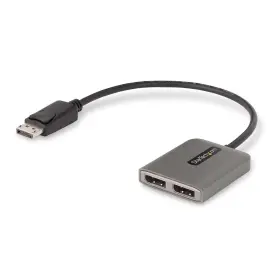
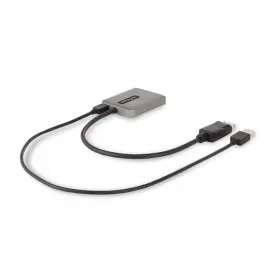
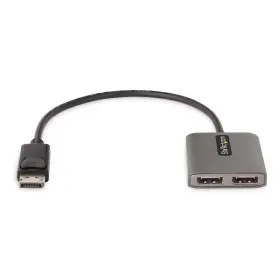
MST14DP122DP STARTECH Displayport Mst Hub Dual Dp
| Brand | STARTECH |
|---|---|
| Manufacturer Part Number | MST14DP122DP |
| Part Type | HUB |
| Unit Type | UNIT |
Review STARTECH 2-port Displayport Mst Hub Dual 4k 60hz Dp To 2x 1ft
The StarTech.com MST14DP122DP 2-Port DisplayPort MST Hub is a compact and versatile solution for expanding your DisplayPort connectivity, allowing you to connect two 4K displays or one 4K and one 2K display to your computer or laptop, while maintaining a high resolution and a 60Hz refresh rate for each monitor.
This hub features two DisplayPort inputs and two DisplayPort outputs, making it an ideal solution for multitasking and multi-monitor setups. The MST Hub supports MST (Multi-Stream Transport) technology, which enables each output to receive and display its own video stream, without the need for additional cables or splitters.
Each output of the hub supports a maximum resolution of 4096x2160 (4K) at 60Hz, allowing for crystal-clear and vibrant images on your displays. This hub is also backward compatible with older DisplayPort and HDMI displays, and can be used as a simple DisplayPort to DisplayPort adapter if needed.
The 1 ft (0.3 m) DisplayPort cables that come with the hub are approximately 3 inches (8 cm) shorter than typical cables, making them ideal for placement in tight spaces and helping to minimize clutter on your desk or workstation.
The compact and durable design of the MST Hub makes it a great fit for small spaces or travel use. It is housed in a lightweight and robust aluminum housing, which not only adds to its sleek appearance but also provides excellent heat dissipation, ensuring stable and reliable performance.
The StarTech.com MST14DP122DP 2-Port DisplayPort MST Hub is the perfect tool for enhancing your computing experience by expanding your display options and providing you with the flexibility to maximize your productivity and efficiency.
Pros and Cons of Buying StarTech.com MST14DP122DP 2-Port DisplayPort MST Hub (Dual 4k 60Hz DP 2.0 x 1ft)
1. Pros:a. Multiple 4k Displays: The StarTech.com MST14DP122DP MST hub supports two 4k displays running at 60Hz, making it an excellent choice for those requiring multiple high-resolution displays for their workstation or gaming setup.
b. DisplayPort 2.0: This hub utilizes the latest DisplayPort 2.0 technology, offering features like Display Stream Compression (DSC), which increases bandwidth and allows for larger resolutions and higher refresh rates.
c. Space-Saving Design: The compact size of the hub keeps your workspace clutter-free while providing multiple display outputs.
d. Easy Setup: The plug-and-play design of the StarTech.com MST hub simplifies setup, allowing users to connect without requiring extensive configuration.
2. Cons:a. Limited Cable Length: The DisplayPort cables provided with the hub are only 1 foot long. Users may need to purchase longer cables separately if their devices are not in close proximity to each other.
b. Cost: This MST hub may be more expensive compared to other single display hubs or solutions that don't support 4k resolution and higher refresh rates.
c. Potential Compatibility Issues: Ensure the other components of your setup, such as your graphics card and display monitors, are compatible with DisplayPort 2.0 and this MST hub.
Conclusion:The StarTech.com MST14DP122DP 2-Port DisplayPort MST Hub offers several advantages such as support for two 4k displays running at 60Hz, space-saving design, and the latest DisplayPort 2.0 technology. However, it comes with a few drawbacks including limited cable length and potential compatibility issues. Ultimately, this MST hub is a valuable investment for those with the need for multiple high-resolution displays and a budget that accommodates its cost.
Recommendation:If you're in the market for a high-performance display hub capable of handling multiple 4k displays at 60Hz, and your setup meets the compatibility requirements, the StarTech.com MST14DP122DP 2-Port DisplayPort MST Hub should be a serious consideration. Users can weigh the pros and cons and determine whether the benefits outweigh the potential drawbacks for their unique setup. Alternatively, if the cost or cable length is a major concern, other multi-display solutions with lower resolutions or lower refresh rates may be more appropriate.
Details:
specifications tvvideoaudio:
- brand: Startech
- mpn: Mst14dp122dp
- part type: Hub
- unit type: Unit
shipping tvvideoaudio:
- type: fixed
- service: standard, expedited
- transit: 14-24 days
- class: standard, expedited
general tvvideoaudio:
- category: Electronics > Home > Tv, Video Audio Parts
returns tvvideoaudio:
- time: 30 days
- policy: returns accepted
- paid by: seller
- method: money back
payments tvvideoaudio:
- wallet: paypal
- credit card: diners-club
- other
seller tvvideoaudio:
- city: charlotte, north carolina
- # reviews: 25600
- rating: 98.4%
offer tvvideoaudio:
- options: ship-to-home
- prices: $49.03–$76.57
- item condition:
- New
- Nuovo
- Neu
- started: december 28, 2024
- availability: in stock
- sold #: 28
Similar Items:
- Startech Mdp2hd4ksw Mini Displayport To Hdmi 4k Audio Video Converter White Details: pulled from working environment. Tested working. Present normal use wear...(August 30th, 2024)
- Startech Cdp2mdpmm6b Startech.com 6 Ft 1.8 M Usb-c To Mini Displayport Cable 4k 60hz Black Part #: Startech CDP2MDPMM6B for sale...(November 11th, 2024)
- Startech Dmsvgavga1 Startech.com 8in Lfh 59 Male To Dual Female Vga Dms Cable Part #: Startech DMSVGAVGA1 for sale...(November 12th, 2024)
- Startech Hd2dpmm3m Startech.com 3 M 9.8 Ft Hdmi To Displayport Cable 4k 30hz Part #: Startech HD2DPMM3M for sale...(November 12th, 2024)
- Startech Dp2hdvga Startech.com Travel A v Adapter 2-in-1 Displayport To Hdmi Or Vga Part #: Startech DP2HDVGA for sale...(November 14th, 2024)
- Startech Mdp2hdec Mini Displayport To Hdmi Adapter Mdp Dongle 1080p Part #: Startech MDP2HDEC for sale...(November 22nd, 2024)
- Startech Mdp2hdmm1mb 3ft 1m Mini Displayport To Hdmi Cable Mdp Adapter Part #: Startech MDP2HDMM1MB for sale...(November 22nd, 2024)
- Startech 065030884402 Mini Displayport To Hdmi Vga Adapter Mdp 1.2 Hbr2 2.0 4k 60hz Part #: Startech HBR2 for sale...(November 22nd, 2024)
- Startech Cdp2dpmm6w 6ft 1.8m Usb C To Displayport 1.2 Cable 4k 60hz Usb-c 6'/1.8 m USB c to displayport monitor adapter and cable in-one avoids the hassle of a bulky adapters for clutter free installation - USB-c supports HUD resolutions up 4k 60HZ white 6 FOOT/1.8 meter matches your mac book display features reversible port ft works with thunderbolt 3 devices that ...(December 27th, 2024)
- Startech Mst14dp122hd Dp To Dual Hdmi Mst Hub 4k 60hz Part #: Startech MST14DP122HD for sale...(December 27th, 2024)
- Startech Cdp2dp141mb 3.3ft 1m Usb C To Displayport 1.4 Cable 8k 5k 4k Type-c Part #: Startech CDP2DP141MB for sale...(December 27th, 2024)